Windows 11 KB5051987 24H2 out with features, direct download .msu
Windows 11 KB5051987 is now available for Windows 11 24H2, and it is actually one of the biggest updates of the year with the OneDrive file resume feature and smarter tab management in File Explorer. You can grab it via Windows Update, or Microsoft has also published direct download links for KB5051987 offline installers (.msu). […] The post Windows 11 KB5051987 24H2 out with features, direct download .msu appeared first on Windows Latest
 admin
admin
Windows 11 KB5051987 is now available for Windows 11 24H2, and it is actually one of the biggest updates of the year with the OneDrive file resume feature and smarter tab management in File Explorer. You can grab it via Windows Update, or Microsoft has also published direct download links for KB5051987 offline installers (.msu).
KB5051987 is a mandatory security update, which means it will download and install automatically at some point in the future. This depends on the Windows Update settings, but my observation is that security updates typically force install in two to three days whether you like it or not, especially if the toggle to grab the latest update is turned on.
This update will show up as “2025-02 Cumulative Update for Windows 11 Version 24H2 for x64-based Systems (KB5051987)“. In some cases, you might not see the update right away because it’s still rolling out globally, but you can check for updates to grab it immediately.
February 2025 Patch Tuesday advances Windows 11 24H2 to Build 26100.3194.
Also, Microsoft has posted a .NET Framework 3.5 and 4.8.1 update for Windows 11 version 24H2. This will benefit the millions of Windows apps built on top of the .NET Framework, so it will download and install automatically alongside the cumulative update.
Download Links for Windows 11 KB5051987
Windows 11 KB5051987 Direct Download Links: 64-bit and ARM-64 | Microsoft Update Catalog.
Note: The update is not yet available, but check back in another twenty minutes.
This month’s update is massive in size because it takes close to 700-800MB of bandwidth to download and install via Windows Update. If you install manually, the size is approx 1,012 MB for Intel or AMD hardware. In the case of ARM hardware, the size of the update could be more than 1GB.
Feb 2025 patch size is huge because it has tons of new features that I’m going to highlight below.
What’s new in Windows 11 Build 26100.3194?
Cursor is having a lot of issues in Windows 11 24H2, and today’s KB5051987 (Build 26100.3194) makes the operating system more usable.
For example, Microsoft claims it finally patched an issue where the mouse cursor disappears when hovering over text fields in Chromium-based browsers like Chrome and Edge.
Windows Latest was the first to report the problem, and we shared the details with Microsoft. Today, the issue is finally fixed with Windows 11 KB5051987, but some of you may continue to run into the cursor disappearing situation in Chromium.
In our tests, we observed that the issue causes the cursor to disappear when editing or selecting texts in the address bar of Chrome and other Chromium browsers. The cursor also disappears when you interact with text fields on websites.
In addition, a bug where the mouse cursor goes transparent with a black box behind it has now been fixed. Similarly, Microsoft has also patched an issue where the cursor stutters in Windows 11 24H2 when you move it across the screen. This can happen even when the memory and CPU usage are minimal.
There could be rough edges where Windows 11 24H2’s cursor could spin (load) all the time once you install the update, but this issue doesn’t appear to affect everyone, and Microsoft is already looking into it.
In terms of new features, after installing Windows 11 Build 26100.3194, you’ll notice a new animation when you hover over app apps on the taskbar. The animation doesn’t change the functionality of app previews, but Windows Latest observed that the animation is buggy. It can overlap the content of another app.
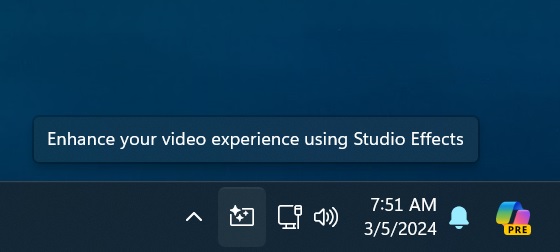
If you have an NPU-capable AI PC, you’ll notice a new button on the taskbar that allows you to configure Windows Studio Effects, such as background blur and other filters, when you’re using your camera. It works regardless of the app, so you can blur yourself in apps that do not support the feature natively.
File Explorer is getting some really nice stuff in Windows 11 KB5051987.
After the update, File Explorer is now able to remember the tabs opened last time and restore them on reboot when the toggle “Restore previous folder windows at logon” is turned on under the Options dialog.
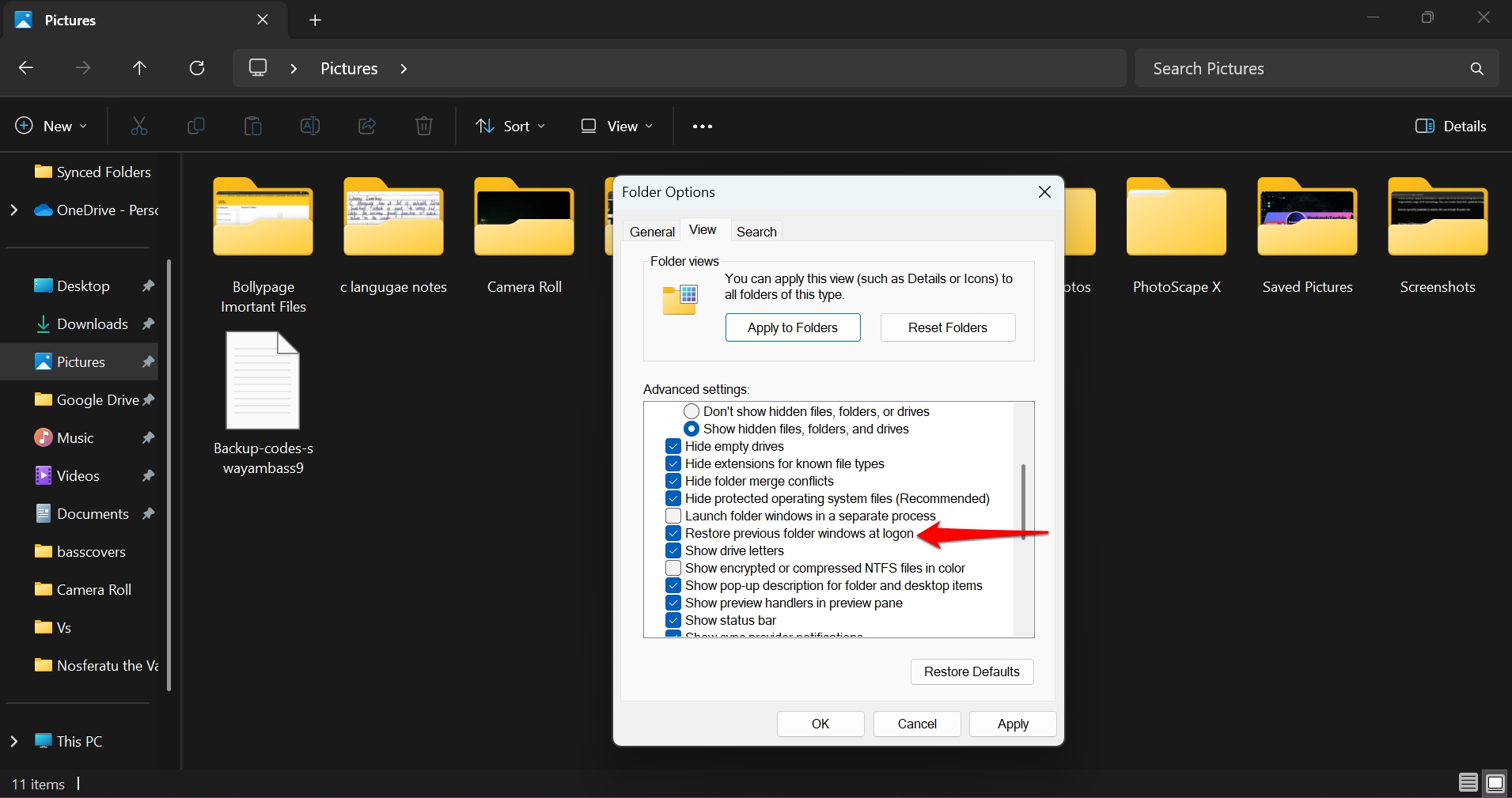
You’ll also need to turn on “Automatically save my restartable apps and restart them when I sign back in” for File Explorer features to work properly. You will find the toggle under Settings > Accounts > Sign in options.
Some bug fixes for File Explorer in KB5051987:
- Search will not repeat the keyword when you try to look for something new.
- File Explorer will not destroy or modify the actual date and times properties when you copy a file. Previously, copying a file also modified the time of creation, but this was due to a bug. It’s now fixed.
- Search box now works properly and does not lose focus.
- Icons are now updated properly when you switch between themes in Windows 11.
As for known issues, Microsoft is not aware of any new problems, but we’ll update this story when we come across a major bug.
The post Windows 11 KB5051987 24H2 out with features, direct download .msu appeared first on Windows Latest